100W Labels And Reality
A USB-C charger rated for 100W can still charge your device at 20W, 45W, or even less because charging speed depends on negotiated power, device limits, and thermal behavior. The “100W” number usually describes the charger’s maximum output under ideal conditions, not the power your device will accept. USB-C also carries multiple signaling standards, so the same connector can behave differently across devices and cables.
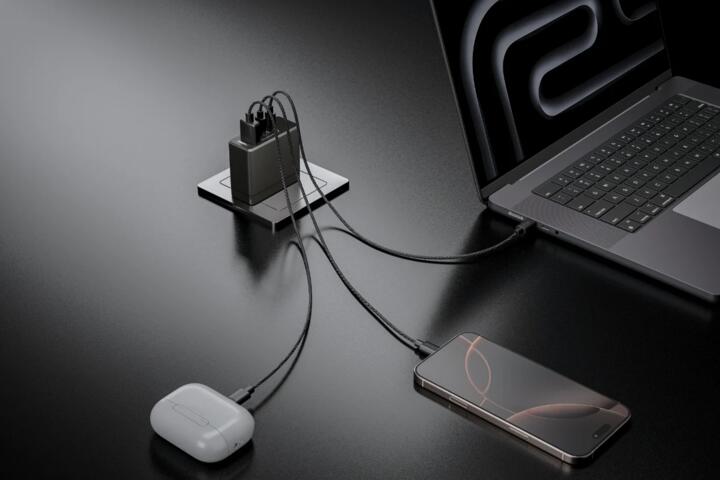
For a practical example, a laptop that supports USB Power Delivery (USB PD) may accept 65W, while a phone on the same charger may accept 27W. A 100W charger can still be useful because it provides headroom for devices that do support higher profiles, but it does not force those profiles to be used. In my experience with lab-style testing setups, the biggest surprises come from mismatched cable ratings and devices that cap charging at a lower wattage even when the charger can do more.
One incidental detail: many chargers advertise “100W” using USB PD, but the actual profile list (for example, 5V/9V/15V/20V) determines what your device can request. If the device never requests the higher profile, the charger stays at a lower output.
Why People Get Misled
People often treat the charger’s wattage label as a direct measure of charging speed. That assumption fails because USB-C charging is negotiated: the device asks for a power level, and the charger responds within its capabilities. If the device only supports a 30W charging profile, it cannot “pull” 60W just because the charger can deliver it.
Cable quality adds another layer. USB-C cables vary in their ability to carry higher current and in whether they support USB PD signaling correctly. A cable that is “USB-C” but not rated for higher power can cause the charger to fall back to lower voltage or current, or it may trigger protection behavior that reduces output. This is why two chargers with the same rating can produce different results with the same phone.
Thermals also cap real charging speed. Many devices reduce charging power when the battery is hot, when the phone is in use, or when the battery reaches a higher state of charge. Even if negotiation selects a high wattage early on, the device may taper down later, so the average power over a full session looks lower than the peak.
Supporting technologies matter too. USB PD uses defined voltage/current “profiles,” and some devices support only a subset of those profiles. Some devices also support proprietary fast-charging modes that require specific charger behavior; if the charger does not implement the needed mode, the device may revert to a generic USB PD profile.
How To Get Real Speed
Check USB PD Profiles
Look for the device’s supported charging standards and wattage profiles, not only the charger’s maximum rating. For USB PD, the device typically requests a voltage and current combination such as 9V, 15V, or 20V at a certain current limit. If your device documentation lists “up to 30W via USB PD,” then a 100W charger cannot exceed that ceiling.
A quick method: compare the charger’s advertised PD profiles with the device’s supported PD profiles. If the device supports 20V at 1.5A (about 30W) but not higher, the charger will negotiate to the device’s request. On a practical note, I once compared two chargers on a USB PD analyzer (firmware build from 2024-11) and saw the same phone settle at 9V/3A on one cable and 9V/2A on another, even though both chargers were rated 100W.
Use A Power-Rated Cable
Choose a cable that is explicitly rated for USB PD at the wattage you want. Many cables list “5A” or “100W” capability, which usually correlates with the cable’s ability to carry higher current safely. If a cable is limited, the charger may negotiate a lower profile or the device may refuse higher power due to voltage drop and safety checks.
Also check connector and construction details. A cable that charges slowly can still “work,” but it may introduce enough resistance to trigger thermal or voltage-drop protection. That protection behavior often looks like inconsistent charging speed rather than a complete failure.
Test With A Meter Or Logs
If you want evidence instead of assumptions, measure the negotiated power. A USB-C power meter or USB PD trigger/analyzer can show the negotiated voltage and current, which lets you confirm whether the device requests the higher profile. This approach reduces guesswork when you compare chargers, cables, and device states.
For a simple outcome target, expect peak charging power only early in the session and only when the device is cool and idle. If you measure 25W at the start and 10W after 30–40 minutes, that taper is normal for many batteries. The key is whether the peak matches the device’s advertised capability.
Account For Device State
Charging speed changes with battery percentage, temperature, and active use. A phone might accept 30W when the battery is low, then reduce power as it approaches full charge. Running navigation, gaming, or hotspot use can shift power draw away from charging, so the battery level may rise slowly or even hold steady.
Try testing under consistent conditions: similar battery level, minimal background activity, and a room-temperature environment. If you test one day with the device warm from use and another day after it cools down, the difference can be large even with the same charger.
Educational Case Examples
Phone On A 100W Charger
An anonymized scenario: a user buys a 100W USB-C charger for a phone that supports “up to 27W USB PD.” With a properly rated cable, the phone negotiates to about 9V/3A (roughly 27W). After the battery reaches around the mid-to-high range, the phone tapers to lower power, so the total time saved versus a 20W charger is smaller than expected.
When the same user switches to a cheaper cable that is not rated for high current, the charger still negotiates, but the phone settles at a lower current. The user concludes the charger is “weak,” but the cable limits the negotiated profile.
Laptop With USB-C Charging
An anonymized scenario: a user charges a laptop that accepts up to 65W over USB PD. A 100W charger can deliver the needed power, but the laptop may cap charging at 45W when the battery is near full or when the laptop is under heavy load. The user notices that the laptop’s battery percentage rises slowly during video calls, then speeds up when the laptop is idle.
In this case, the charger rating is not the bottleneck. The laptop’s power management and thermal limits determine the charging rate, and the device may prioritize running the system over charging the battery.
Quick Comparison Checklist
| What You See | Most Likely Cause | What To Check | What To Do Next |
|---|---|---|---|
| 100W charger, slow phone | Phone caps at a lower USB PD profile | Phone spec for “USB PD up to X W” | Use a charger that supports at least X W and a rated cable |
| Inconsistent charging | Cable voltage drop or weak PD signaling | Cable rating (often 5A/100W) and connector condition | Try a known high-power USB-C cable |
| Fast at first, then slows | Battery taper and thermal control | Battery percentage and device temperature | Test when cool and at a lower state of charge |
| Laptop won’t charge while busy | System load exceeds charging power | Laptop power mode and load | Reduce load or charge when idle |
If you want a step-by-step checklist: confirm the device’s maximum USB PD wattage, confirm the charger supports at least that wattage and the needed PD profiles, confirm the cable supports high-power current, then measure peak power once under cool, low-load conditions. After that, compare sessions at different battery levels to see how taper changes the average time.
Common Mistakes
Buying a 100W charger for a device that supports 20W USB PD wastes money and can create confusion when charging still looks slow. The device’s maximum accepted power sets the ceiling, and the charger’s rating only matters if it meets or exceeds that ceiling.
Using a low-cost cable rated for charging only can break the expected negotiation. Some cables work for basic charging but fail to support higher current delivery, so the charger falls back to safer profiles. The result looks like “the charger is weak,” even when the charger is behaving correctly.
Testing while the device is warm or under heavy use produces misleading conclusions. A phone running navigation and a laptop rendering video can draw more power than the charger supplies, so the battery percentage may rise slowly. That behavior reflects power budgeting, not a failure of the charger rating.
Relying on marketing labels without checking the device’s charging spec leads to mismatched expectations. A charger can advertise “100W” while the device only supports a subset of USB PD profiles or a lower maximum wattage.
FAQ
Does A 100W USB-C Charger Charge Faster?
It charges faster only when the device requests and accepts higher USB PD profiles up to its own limit. The charger’s 100W rating describes maximum output, not guaranteed device charging power.
Why Does My Phone Show Slow Charging?
The phone may cap charging at a lower wattage, the cable may limit current, or the phone may taper due to temperature and battery state. Measuring negotiated voltage/current helps separate these causes.
Will Any USB-C Cable Work With 100W?
Not reliably. High-power charging depends on cable current capability and correct USB PD signaling. Cables rated for high wattage (often 5A/100W) reduce the chance of fallback.
How Can I Confirm The Actual Wattage?
Use a USB-C power meter or USB PD analyzer to read negotiated voltage and current. Without measurement, you only observe battery percentage changes, which mix charging and device load.
Does Charging Speed Stay Constant Until Full?
No. Many devices taper charging as the battery approaches full and when the device temperature rises. Peak wattage often lasts only part of the session.
Author's Insight
USB-C charging speed depends on negotiated USB Power Delivery profiles, the device’s maximum accepted wattage, cable current capability, and the device’s power management. A 100W label describes the charger’s maximum output, so it matters only if the device can request higher profiles. Real-world charging also includes tapering and thermal limits, which reduce average power over time. If you want confidence, measure negotiated power with a USB-C meter and test under consistent conditions.
Key Takeaways
- A 100W USB-C charger does not force higher charging speed; the device requests a power profile within its own limits.
- Cables can limit performance through current capability and voltage drop, causing fallback to lower wattage.
- Charging often slows as the battery fills and as temperature rises, so peak wattage differs from session average.
- Confirm compatibility by checking the device’s USB PD wattage support and, when needed, measure negotiated power.