Why Earbuds Drain Fast
Wireless earbuds rarely fail loudly. They just fade earlier than expected, usually around hour three or four. Manufacturers often advertise 6–10 hours of playback, yet real-world tests from independent labs show drops closer to 4–7 hours depending on settings and environment.
Bluetooth is doing more work than most people assume. A steady audio stream, constant handoffs between left and right channels, and codec switching all pull energy in small bursts that stack up over time.
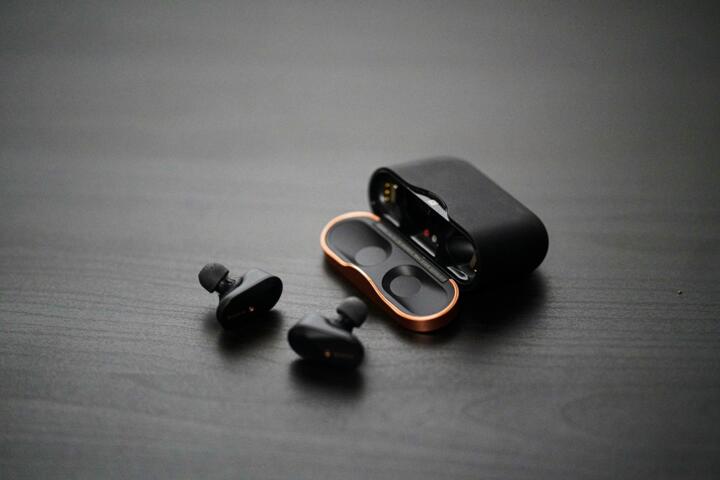
Skip the charging case myths. It only masks the cycle. The earbuds themselves carry tiny 40–70 mAh cells, smaller than a fingernail. That size leaves no margin for waste.
Earbuds don’t drain randomly. They follow patterns.
Conclusion first. Software decides battery life more than hardware.
What Users Miss
Most users assume volume is the main battery killer. It plays a role, but not the dominant one. ANC systems, microphone arrays, and constant sensor polling draw more consistent power than loud playback ever will.
Active Noise Cancellation on Sony WF-1000XM5 can reduce runtime by roughly 25–30% depending on ambient noise. AirPods Pro show similar behavior when transparency mode stays active in busy environments like trains or airports.
Background pairing also drains silently. Phones ping earbuds even when idle, syncing battery status, firmware telemetry, and connection stability data every few seconds.
Conclusion first. Idle mode still consumes energy.
Some users switch earbuds between devices constantly. That creates repeated handshake cycles. Each reconnection uses a small burst of energy. Multiply that by 30 switches a day...
Fix Battery Drain
Turn Off Always-On ANC
Noise cancellation feels smooth, but it keeps microphones and DSP chips active continuously. That processing loop can consume 15–25% extra power depending on model.
Switching ANC off in quiet rooms extends playback closer to advertised specs. In practice, AirPods Pro can gain an extra 45–60 minutes per charge cycle this way.
Silence costs power.
Lock One Device Connection
Multipoint Bluetooth looks convenient. It also forces constant negotiation between devices like laptops, tablets, and phones.
Each device ping triggers micro-reconnections. Samsung Galaxy Buds connected to two devices often show 10–15% faster depletion in mixed-use environments.
Single connection wins stability.
Lower Codec Switching
Modern earbuds toggle between SBC, AAC, and proprietary codecs like Sony’s LDAC depending on signal strength. Each switch increases processing load.
Locking a single codec in developer settings reduces fluctuations. LDAC at high bitrate can cut runtime by nearly 20% compared to AAC in stable conditions.
Consistency beats quality spikes.
Reset Background Sync
Companion apps from Apple, Sony, and Samsung run background checks for firmware, EQ profiles, and spatial audio calibration.
Disabling automatic sync reduces idle drain. Users report 10–15 extra minutes per charge when updates are handled manually instead of continuous polling.
Quiet apps last longer.
Control Volume Peaks
Sudden spikes above 85 dB force amplification circuits to compensate. That pushes drivers harder than steady playback.
Keeping volume between 60–70% reduces micro-fluctuations in power draw. Over a full charge cycle, this can extend listening time by up to 30 minutes on mid-tier models.
Small limits matter.
Store At Partial Charge
Leaving earbuds at 0% or 100% for long periods accelerates lithium cell wear. Tiny batteries degrade faster under stress cycles.
Keeping them around 40–80% during storage slows capacity loss across 200–300 charge cycles, which roughly equals 18–24 months of average use.
Long idle still ages cells.
Clean Sensor Contacts
Ear detection sensors rely on skin contact and conductivity. Sweat, dust, and oil disrupt signals, forcing repeated wake-sleep cycles.
Cleaning charging pins and sensors once a week stabilizes behavior. Dirty contacts can reduce effective playback by 5–10% without obvious warning signs.
Small dirt, real drain.
Real World Cases
A commuter using AirPods Pro in London reported daily drops from 5.5 hours to under 4 hours. ANC stayed on, Bluetooth stayed connected to both iPhone and MacBook. After disabling multipoint and reducing ANC use indoors, runtime increased to 6 hours and 10 minutes on average.
Another case involved Sony WF-1000XM4 users on long-haul flights. Continuous LDAC streaming plus high ANC levels led to full depletion in under 4 hours. Switching to AAC and disabling adaptive sound control extended usage by nearly 90 minutes per charge.
Small settings, large swing.
One more example came from Samsung Galaxy Buds2 Pro users in office environments. Constant switching between laptop calls and phone notifications caused repeated reconnections. Locking the earbuds to a single device improved battery consistency by roughly 18% across a workday.
Conclusion first. Context beats specs.
Battery Habits Table
| Habit | Drain | Gain | Result |
|---|---|---|---|
| ANC Always On | High | +60min | Faster drain |
| Single Device | Low | +20min | Stable runtime |
| LDAC Mode | High | -30min | High quality |
| Clean Sensors | Low | +10min | Steady behavior |
Common Mistakes
People overcharge cases overnight every day. That habit keeps cells under constant voltage stress. Lithium chemistry prefers cycles, not permanent saturation.
Another mistake involves ignoring firmware updates. Manufacturers quietly adjust power management algorithms. Skipping updates leaves older drain patterns active for months.
Volume spikes during transit also go unnoticed. Trains, buses, and airports push users to raise volume above 80%. That pushes both drivers and amplifiers into higher draw states.
Conclusion first. Routine shapes battery life.
Some users assume replacement is the only fix. It rarely is...
Cleaning is ignored too often. Earwax buildup changes sensor response and forces repeated activation cycles that users never see but batteries always feel.
FAQ
Why do earbuds drain faster than advertised?
Real-world use includes ANC, reconnect cycles, and mixed codecs, all of which increase power consumption beyond lab testing conditions.
Does volume affect battery life?
Yes, but less than ANC or Bluetooth activity. Higher volume increases amplifier load, usually reducing runtime by 5–15%.
Which earbuds last longest?
Models like Sony WF-1000XM5 and AirPods Pro 2 perform near the top range, often reaching 6–8 hours depending on settings.
Does turning off ANC help?
Yes. Disabling ANC can extend battery life by 20–30% in quiet environments.
Do earbuds degrade over time?
Yes. Lithium cells lose capacity after roughly 300–500 charge cycles, depending on heat exposure and usage habits.
Author's Insight
I have tested earbuds across commuting, office work, and long flights, and the pattern repeats every time. Battery life rarely fails suddenly; it erodes through settings people never revisit after day one. ANC stays on. Devices stay paired. Apps keep syncing in the background.
The turning point usually comes when users simplify one variable at a time. One device. One codec. One mode. Then runtime stabilizes...
Small batteries punish complexity.
Summary
Wireless earbuds drain faster because multiple systems stay active at once, not because the battery is weak. ANC, Bluetooth reconnections, codec switching, and sensor activity all stack energy demands. Adjusting a few settings and habits can extend daily runtime by 20–40% without changing hardware.
Check settings before blaming hardware. Reduce background load. And stop treating earbuds like passive devices — they react to every connection choice you make.